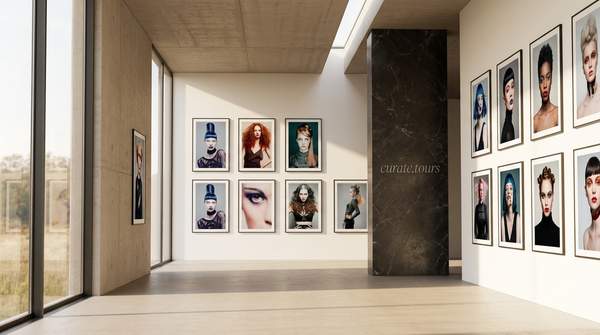
A finished body of work can be ready for an audience long before its online presentation feels finished. Uploading images to a portfolio page may show each piece clearly, but it leaves many exhibition decisions untouched: where a visitor enters, what they encounter first, which works share a wall and how one room leads into another.
curate.tours brings those decisions into a browser-based 3D exhibition builder. Artists, photographers, curators and designers can create custom floorplans, mount high-resolution work inside the space, add 3D staging elements, shape the lighting and publish a virtual exhibition without writing code.
Start With the Space Around the Work
Building a virtual gallery begins with architecture rather than a stack of uploaded images. curate.tours supports custom vector floorplans, giving you control over the shape and arrangement of the exhibition before individual works take their places.
That changes the way a show can be planned. Instead of fitting a body of work into a predetermined sequence, you can think about separate rooms, connecting walls, transitions and the amount of space each piece needs around it.
The floorplan can respond to the exhibition itself. A compact group of related works might occupy one enclosed area, while larger pieces can sit in a more open section where visitors have room to approach them from a distance.
Place Artwork With Its Surroundings in Mind
Once the floorplan is established, high-resolution artworks can be mounted within the 3D space. Their placement becomes part of the curatorial process because each work exists in relation to walls, neighbouring pieces and the visitor’s position inside the gallery.
This creates decisions that a conventional image grid cannot represent. Two works can face one another across a room, a larger piece can anchor the end of a space or a smaller group can form a deliberate sequence along one wall.
You can also consider what visitors will see before they reach a particular piece. A work visible through an opening or from across the gallery can create anticipation and establish a natural path through the exhibition.
Build Context With 3D Staging Elements
Artwork does not have to sit inside an empty digital shell. curate.tours supports realistic 3D pedestals and furniture that can be arranged within the exhibition alongside the work.
Used deliberately, these objects can help establish scale and organise the room. A pedestal can give a sculptural work its own position in the space, while seating or other staging elements can influence how open or contained an area feels.
The goal is not to fill every room. Empty space can carry just as much weight as an object, giving individual works room to register before the visitor moves towards the next part of the exhibition.
Use Lighting to Shape the Exhibition Atmosphere
Lighting affects how a room feels before a visitor studies any individual piece. curate.tours lets creators customise atmospheric lighting alongside the physical arrangement of the gallery.
That adds another layer to presentation. A show built around bright graphic work may call for a different visual environment from one centred on subdued photography or a series that benefits from a quieter setting.
Lighting can therefore develop alongside wall placement and artwork arrangement. The virtual room becomes part of the presentation rather than neutral packaging around it.
Move From an Empty Floorplan to a Published Exhibition
The major exhibition decisions stay within the same browser-based workflow. A project can move through four connected stages:
- Sketch the floorplan: establish the rooms, walls and overall route through the exhibition.
- Mount the work: position artworks inside the space and consider scale, grouping and sightlines.
- Stage the environment: arrange relevant 3D furniture or pedestals and shape the lighting.
- Publish and share: give visitors an online entry point to the completed gallery.
Keeping those stages connected makes revision part of the design process. A wall can change because the artwork arrangement feels crowded, or a piece can move because the sightline from another part of the gallery creates a stronger introduction.
The result is a gallery developed as one spatial composition. Architecture, artwork placement and atmosphere can respond to one another instead of being treated as separate finishing tasks.
Give Visitors a Space They Can Enter
Publishing turns the project from a private layout into a virtual exhibition that visitors can enter online. curate.tours is built for interactive 3D viewing across devices, so the completed presentation can be shared through an entry link rather than delivered as a static sequence of exhibition images.
Visitors encounter the work from changing positions as they move through the space. That gives scale, distance and relationships between pieces a role in the online experience that a conventional scrolling page cannot reproduce in the same way.
The route does not have to dictate every movement. You can establish a deliberate spatial progression while still giving visitors the freedom to pause, change direction or spend longer in one area.
Design for the Work You Actually Want to Present
A custom virtual exhibition does not require every project to resemble the same conventional white-cube gallery. Because the floorplan, artwork arrangement, staging and atmosphere can be developed together, the space can respond to the specific body of work being shown.
An artist preparing a focused solo exhibition may want a compact progression from one group of pieces to another. A curator working with several contributors may need distinct areas that establish relationships without making the whole exhibition feel crowded.
This is where curate.tours moves beyond simply putting images online. The platform gives creators control over the room around the work, making layout, distance, sequence and atmosphere part of how the exhibition is presented.
Frequently Asked Questions
Do you need coding to build a gallery with curate.tours?
No. curate.tours supports browser-based exhibition creation without requiring you to write code, so you can concentrate on designing, staging and presenting the gallery.
Can you design your own floorplan in curate.tours?
Yes. curate.tours supports custom vector floorplans, allowing you to shape the architecture of the exhibition instead of relying on a single fixed room arrangement.
Can you add furniture and lighting to a curate.tours exhibition?
Yes. curate.tours supports realistic 3D pedestals and furniture as well as atmospheric lighting controls, giving you additional ways to stage the work and shape the surrounding space.
How do visitors access a curate.tours exhibition?
Published curate.tours exhibitions can be shared through an online entry link. Visitors can access the interactive 3D gallery across supported devices and move through the virtual exhibition online.
Build the Exhibition Around the Work
A virtual gallery becomes considerably more expressive when the room can respond to the art rather than simply contain it. Custom floorplans, artwork placement, 3D staging and lighting give you control over what visitors encounter as they move from one part of the exhibition to another.
Start building your 3D exhibition with curate.tours and create a space shaped around the work you want to present.